This lesson introduces early coding concepts using the Scratch platform. Students will learn how to create a simple game that includes at least one animated character.
Activity Name
- Dragon Flight, Creating a Simple Side Scroller
Creator
- Kalene Savage-Zent
Learners
Beginner level: no coding skills required.
- Adults with beginner-level programming skills are often developing their own abilities or seeking to support their children or students in building a foundation for future coding concepts.
- Interests may include: medieval games, treasure hunting, dragons, 2D gaming, retro gaming, side scrollers, programming, conditional logic, command-based programming, beginner-friendly languages, universal coding principles, computer science, machine programming, user experience, STEM education, science for kids, creating games for kids, and open-source coding academies.
Lesson Objective(s)
- Replicate the Dragon Flight game from scratch, and/or build a similar game with the knowledge you’ve learned while following along this programming activity.
- Create Dragon Flight, The Game
- Style it to your liking (colors, different sprites, treasure, debris, general themes, etc.)
- Create your own game based on this activity, similar or not, to Dragon Flight in Scratch.
- Add more levels, develop the animations further, build upon the point systems (add potions for speed, or magic wands for stamina, etc.).
- Possibly: Learn how to troubleshoot simple command sequences
Time duration
- 45-60 minutes
- This gives time to pause and repeat portions of the video if needed. As well as a range of time for those who would like to take more time choosing their own preferences/customizations.
- Contingencies: Can take more if someone with little-to-no computer experience
- This might take less time for people with Scratch experience, who just want to make this specific game/type of game.
Materials
- High speed internet access
- Preferably an ergonomic mouse
- Laptop or computer with speakers
Preparation
Below are some resources that learners should watch or learn before they begin this programming activity so that they have the knowledge/skills needed to complete it.
- Side Scroller Games Wiki
- What are we even doing in Scratch? Learn about the type of game we are building and what kind of physics are being supported by the coding.
- i.e., ‘do our commands make the player go up and down or do they actually make the background objects move so that the main character looks as though they are moving?
- What are we even doing in Scratch? Learn about the type of game we are building and what kind of physics are being supported by the coding.
- The Basics of Universal Coding Concepts
- This resource is phenomenal for adults and children alike.
- Don’t be deterred by its target audience—this article is perfect for learners of all ages to grasp fundamental, universal coding concepts.
- This resource is phenomenal for adults and children alike.
- Let’s talk conditionals
- Read about conditional statements before diving into writing them. What these commands mean and how they are vital to the universe of coding
Programming concepts
- Iteration (looping)
- Conditional Statements
If and if-else
- Variables
- Repeats
- Event handling
- Random Numbers
Sample
- Dragon Flight, The Game:
Game Instructions
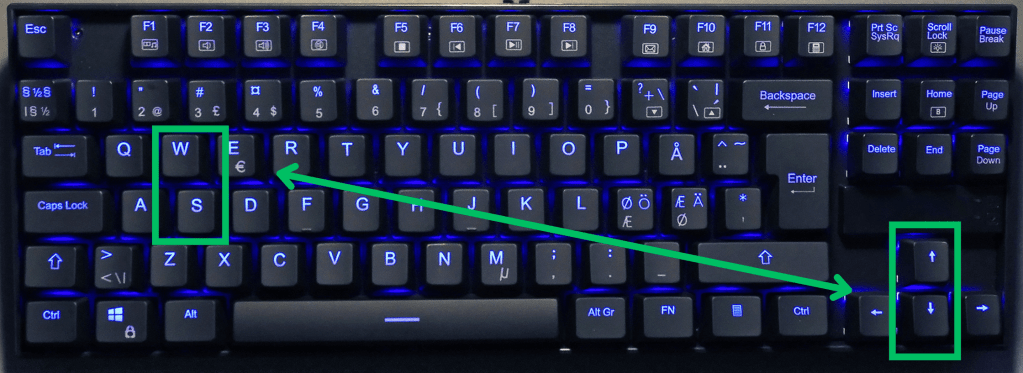
- Fly your dragon across the sky using the up and down arrow keys, or W and S for left-handed folk.
See image below
Create Dragon Flight Tutorial
Substitute projects to exercise these programming skills:
Change the world rules
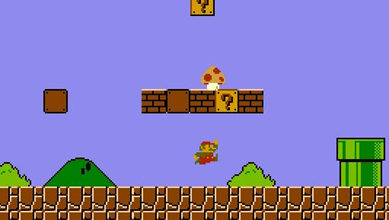
Create a side-scroller game where the player moves left and right, and the background stays stagnate (think original Super Mario Brothers).
- Your readings will help you through this!
- Read more from Sphero and teach someone else the basics of these concepts to test your knowledge and comprehension.
- Start a conversation with ChatGPT about the concepts listed in this tutorial. Ask specific questions and use conversational language. Do not stop until you are able to explain these concepts, briefly, to someone else or use them in Scratch. Some questions to get you started are below:
- Give me an example of the coding concept ___ in practice and what an outcome would look like?
- Why is ___ important to a script?
- Define ___ and give me a real-life example.
- Explain it a little more simply.
- What is the difference between ____ and ____? (e.g., sequencing and listing).
- Start a conversation with ChatGPT about the concepts listed in this tutorial. Ask specific questions and use conversational language. Do not stop until you are able to explain these concepts, briefly, to someone else or use them in Scratch. Some questions to get you started are below:
Credit
This original lesson plan was inspired by my experience with classic side-scroller games. While exploring Scratch, I came across a dragon sprite I liked—and built the game concept around it.
I credit my passion and experience in gaming to my brother, Russell Savage, and a few Scratch tutorials that helped me master the controls.
 Kalene Savage